
How to Type in Nepali: The Ultimate Guide to Online Tools & Keyboard Layouts
Umesh Chapagain
June 8, 2026 · 8 min read · Founder & Lead Developer
In today's digital era, the ability to communicate in your native language online is more important than ever. Whether you are a student drafting an essay, a blogger writing an article, a professional composing official emails, or simply chatting with family and friends on social media, knowing how to type in Nepali is a fundamental digital skill.
While Devanagari is a beautifully complex script, typing it on modern computers and smartphones has become incredibly straightforward. Gone are the days when you had to memorize rigid legacy layouts or install bulky software. Today, you can type in Nepali instantly using web-based tools, phonetic transliteration, or even your voice.
In this ultimate guide, we will explore the best methods, tools, and keyboard layouts to write in Nepali, ensuring your text is web-compatible, search-friendly, and easy to read across all platforms.
Why Unicode is Essential for Modern Nepali Typing
Before diving into typing methods, it is crucial to understand the standard format of digital Nepali text. Historically, Nepali typing relied on custom-encoded legacy fonts such as Preeti, Kantipur, PCS Nepali, and Sagarmatha. While these fonts allowed people to print documents, they posed severe digital challenges:
- Lack of Compatibility: If you wrote a document in Preeti and sent it to someone who didn't have the Preeti font installed on their computer, the text would appear as gibberish (Latin symbols like
s]kfninstead ofनेपाल). - Not Searchable (Zero SEO Value): Search engines like Google cannot crawl, read, or index legacy font text. If you write a blog post in Preeti, it will never show up on search results when someone searches for those keywords.
- Inoperable on Mobile and Social Media: You cannot paste Preeti-encoded text into Facebook, Twitter, WhatsApp, or email clients because those platforms do not support proprietary ASCII font overrides.
To solve this, the technology industry adopted Unicode Devanagari. Unicode is an international standard that assigns a unique, permanent code point to every single character in the Devanagari script. Regardless of the font, device, or operating system, the character क is always understood as क.
Using Unicode guarantees that your text will:
- Load perfectly on any smartphone, tablet, or PC.
- Be easily indexed and ranked by search engines.
- Allow copy-pasting across all websites and applications.
To learn more about the transition from traditional typefaces to modern systems, check out our guide on Understanding Nepali Fonts: Unicode vs Preeti vs Legacy Formats.
3 Easy Methods to Type in Nepali Online
Depending on your comfort level, typing speed, and specific requirements, there are three primary methods to type in Nepali today.
1. Phonetic (Romanized) Transliteration
Phonetic typing is by far the most popular and easiest method for most internet users. It allows you to spell out Nepali words using standard English letters (QWERTY keyboard layout) based on how they sound. The transliteration engine automatically converts your English keystrokes into Devanagari script in real-time.
For example:
- Typing
nepalconverts toनेपाल - Typing
namasteconverts toनमस्ते - Typing
ramroconverts toराम्रो - Typing
sanchaiconverts toसन्चै
This method requires zero prior training or layout memorization. It is ideal for anyone who is already comfortable typing in English. You can start typing phonetically using our free Easy Nepali Typing Tool and learn practical tips in our dedicated article on Easy Type Nepali: The Ultimate Guide to Nepali Words Typing.
2. Nepali Voice Typing (Speech-to-Text)
If you want to write long articles, letters, or essays quickly, writing manually can be exhausting. Voice typing solves this by using advanced speech-recognition engines to transcribe your spoken words into Devanagari text in real-time.
Using the microphone of your laptop or smartphone, you simply speak clearly in Nepali, and the speech-to-text engine writes it down. This is the fastest method, letting you compose up to 150 words per minute.
You can try this hands-free method directly on our Nepali Voice Typing Tool. For tips on setting up your browser permissions, speaking at the optimal pace, and improving dictation accuracy, check out the Nepali Voice Typing Guide.
3. Traditional Keyboard Layouts
For professional typists in government offices, newsrooms, and legal firms, traditional keyboard layouts like Preeti or Unicode Romanized are preferred. These layouts assign Devanagari consonants, vowels, and diacritics directly to specific keys.
While the learning curve is steep, mastering a physical Devanagari layout can yield exceptional typing speeds.
- If you have legacy documents in old formats, you can easily use our Preeti to Unicode Converter to make them web-compatible.
- Conversely, if an official government registry requires Preeti font files, you can use our Unicode to Preeti Converter to transform modern text back into legacy format.
- To discover and download beautiful Devanagari typefaces, visit our Browse Nepali Fonts page.
How to Type in Nepali Using TypeNepal
TypeNepal provides a seamless, web-based workspace to type in Nepali for free. You do not need to register, download software, or configure complex settings.
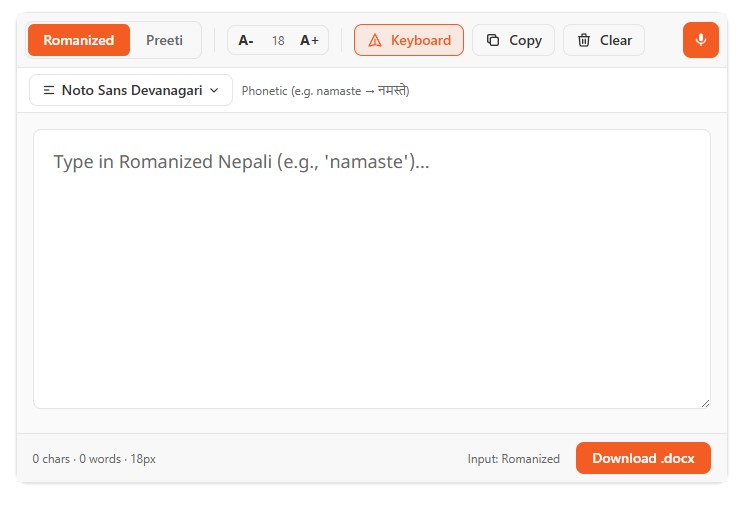
Follow these simple steps to compose your text:
- Access the Tool: Open the Easy Nepali Typing Tool.
- Start Typing: Click inside the editor area and start typing phonetically using your English keyboard. For instance, type
mero desh nepal hoand press spacebar after each word. It will instantly transform intoमेरो देश नेपाल हो. - Format & Edit: If you need a more advanced word processor to write letters, structure paragraphs, or save documents, use the TypeNepal Documents tool.
- Copy & Share: Once your text is ready, click the Copy button to copy the Unicode text. You can now paste it directly into Microsoft Word, Gmail, Facebook, or any other application.
Understanding the Nepali Keyboard Layout
If you choose to use the traditional layout or want to know how phonetic systems map Latin characters to Devanagari, it helps to understand the keyboard layout.
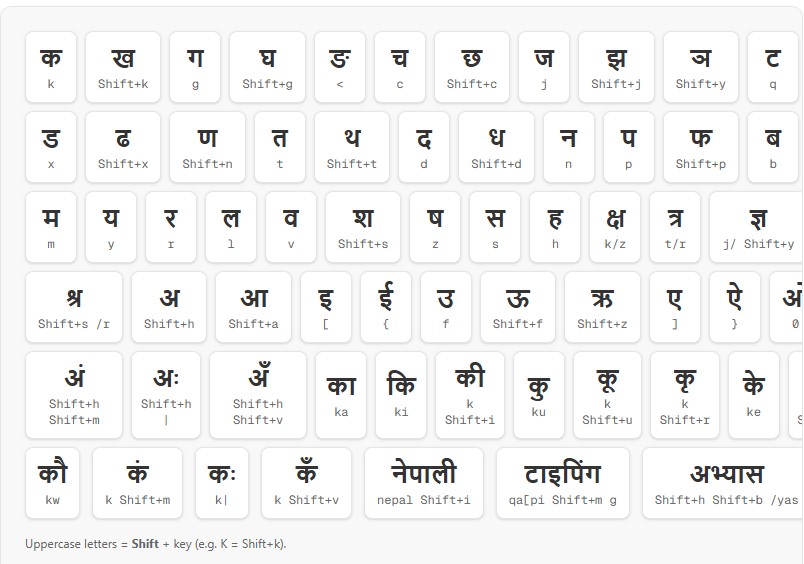
In Devanagari typing, characters are built dynamically:
- Consonants: Standard keys map to consonants like
क(ka),ख(kha),ग(ga). - Vowel Marks (Matras): When added to a consonant, they modify its sound, such as
ा(kaar),ि(halkay),ी(dirghay). - Conjunct Characters (संयुक्त अक्षर): Complex characters like
क्ष,त्र, orज्ञare formed by combining two consonants with a halant (्) mark. The halant strips the inherent vowel sound from the first consonant, merging it with the next. For example, typingक+्+षgenerates the compound letterक्ष.
For a full character-by-character breakdown and system setup instructions, refer to The Complete Guide to Typing in Nepali: Unicode, Romanized Input, and Best Practices.
Tips to Boost Your Nepali Typing Speed and Accuracy
Like any digital skill, typing fast in Nepali requires regular practice and the right tools. Here are our top tips:
- Practice Regularly: Spend 10 to 15 minutes daily practicing Devanagari typing. You can use our interactive Typing Practice Tool to get comfortable with the keys.
- Test Your Speed: Measure your progress! Take a test on the Nepali Typing Test Tool to calculate your Words Per Minute (WPM) and accuracy score.
- Pay Attention to Suggestions: Phonetic transliterators often provide a suggestion bar. If the system translates a word incorrectly (e.g., distinguishing between
maforमandmaaforमा), select the correct variation from the suggestion list. - Keep a Layout Sheet Handy: If you are learning the traditional keyboard, print a layout chart or keep it open on a split screen. This prevents you from looking down at your physical keys, which builds muscle memory much faster.
Frequently Asked Questions (FAQs)
How do I type in Nepali on my mobile phone?
Both Android and iOS offer native support for Devanagari typing.
- Android: Install Google's Gboard from the Play Store, go to Language Settings, and add "Nepali (Latin)" for phonetic typing, or "Nepali" for a direct Devanagari keyboard.
- iOS: Open Settings -> General -> Keyboard -> Keyboards -> Add New Keyboard, and select "Nepali". You can easily toggle between keyboards using the globe icon on your screen.
Is Nepali Unicode friendly for Google Search?
Yes! In fact, Unicode is the only format that Google search bots can read. If you write articles, metadata, or titles in Nepali Unicode, your website will be searchable and optimized for search engine optimization (SEO).
Can I use TypeNepal tools offline?
TypeNepal is an online web application, meaning you need an active internet connection to load the site. However, once the pages are loaded in your browser, the translation and voice typing engines process your inputs locally on your machine, ensuring high speed and privacy.
What is the difference between Romanized Unicode and Traditional Unicode?
- Romanized Unicode maps Devanagari characters phonetically to English keys (e.g., key
kisक, keytisत). It is standardized by Madan Puraskar Pustakalaya and is very intuitive for bilingual users. - Traditional Unicode maps characters similarly to the old Preeti layout, making it the preferred choice for typists who already have muscle memory trained on Preeti typewriters.
Conclusion
Typing in Nepali has evolved into an effortless, highly accessible activity. Whether you prefer the phonetic convenience of Romanized transliteration, the blazing speed of voice typing, or the professional accuracy of traditional keyboard layouts, modern Unicode standards ensure that your written Nepali is ready for the global web.
Start your typing journey today by exploring our suite of tools on TypeNepal, measuring your speed with our Nepali Typing Test, and building your documents securely on our platform. Happy typing!
Umesh Chapagain
Founder & Lead DeveloperUmesh Chapagain is the founder of TypeNepal and a software engineer with extensive experience in building web applications for language accessibility. He specializes in Unicode standards, Devanagari typography, and browser-based tool development. His work focuses on creating free, privacy-first tools that make Nepali and Hindi digital communication accessible to everyone — from students and professionals to the global Nepali diaspora.
Related Articles
How to Use Free and Easiest Nepali Typing Tool: Type in English(Romanized), Get Nepali Text
Learn how to use the Easiest Nepali Typing tool to convert English (Romanized) text into Nepali Devanagari script instantly. Includes word examples and a primer on Nepali alphabets.
How to Type Nepali: Complete Romanized Keyboard Guide
Learn how to type Nepali using Romanized phonetic input. This guide covers vowels, consonants, vowel signs, digits, special symbols, and word examples to help you type Devanagari script effortlessly.
Nepali Voice Typing: The Complete Guide to Voice to Text in Nepali
Learn how to use Nepali voice typing to convert speech to text instantly. This step-by-step guide covers everything about voice to text Nepali — how it works, tips for accuracy, and the best free tools.