
Nepali Voice Typing: The Complete Guide to Voice to Text in Nepali
Umesh Chapagain
June 7, 2026 · 7 min read · Founder & Lead Developer
Typing in Nepali has come a long way. From the days of memorizing complex Preeti keyboard layouts to the convenience of Romanized phonetic input, the methods have only gotten easier. But the most effortless way to write in Nepali today? Simply speak. Nepali voice typing lets you convert your spoken words into written Devanagari text — instantly, accurately, and completely free.
In this comprehensive guide, we will walk you through everything you need to know about voice to text Nepali technology: what it is, how it works, how to use it on TypeNepal, and practical tips to get the best accuracy out of every dictation session.
What is Nepali Voice Typing?
Nepali voice typing (नेपाली भ्वाइस टाइपिङ) is a speech-to-text technology that listens to your spoken Nepali and converts it into written Devanagari script in real time. Instead of pressing individual keys on a physical or virtual keyboard, you simply speak into your device's microphone. The speech recognition engine identifies the sounds, matches them to Nepali words, and outputs clean Unicode text.
This technology is particularly valuable for:
- Students writing long essays or assignments in Nepali
- Professionals drafting emails, reports, or official letters
- Content creators producing blog posts, social media content, or scripts
- People with disabilities who find traditional keyboard typing difficult
- Anyone who wants to save time and type faster in Nepali
The beauty of voice to text Nepali is its simplicity — no special software to install, no keyboard layouts to memorize, and no typing skills required. If you can speak Nepali, you can type Nepali.
How Does Voice to Text Nepali Work?
Modern Nepali voice typing tools like TypeNepal use the Web Speech API, a powerful speech recognition interface built into browsers such as Google Chrome and Microsoft Edge. Here is what happens behind the scenes when you click the microphone button:
- Audio capture: Your browser accesses your device's microphone and captures your spoken audio.
- Speech processing: The audio stream is sent to the browser's built-in speech recognition engine (powered by cloud-based language models from Google or Microsoft).
- Language matching: The engine analyzes the phonetic patterns of your speech and maps them to Nepali words using trained Devanagari language models.
- Real-time output: Recognized text appears on your screen instantly. Interim (partial) results show up as you speak, and final results are confirmed once the engine is confident.
Privacy note: TypeNepal does not store, record, or transmit your audio data. All processing is handled by your browser's native speech engine. Your voice data stays between your device and the browser's speech service.
How to Use Nepali Voice Typing on TypeNepal
Getting started with Nepali voice typing on TypeNepal takes less than 30 seconds. Follow these steps:
Step 1: Open the Nepali Voice Typing tool in Google Chrome or Microsoft Edge.
Step 2: You will see a large orange microphone button in the center of the screen. The tool is set to Nepali by default — no configuration needed.
Step 3: Click the large microphone button on the screen.
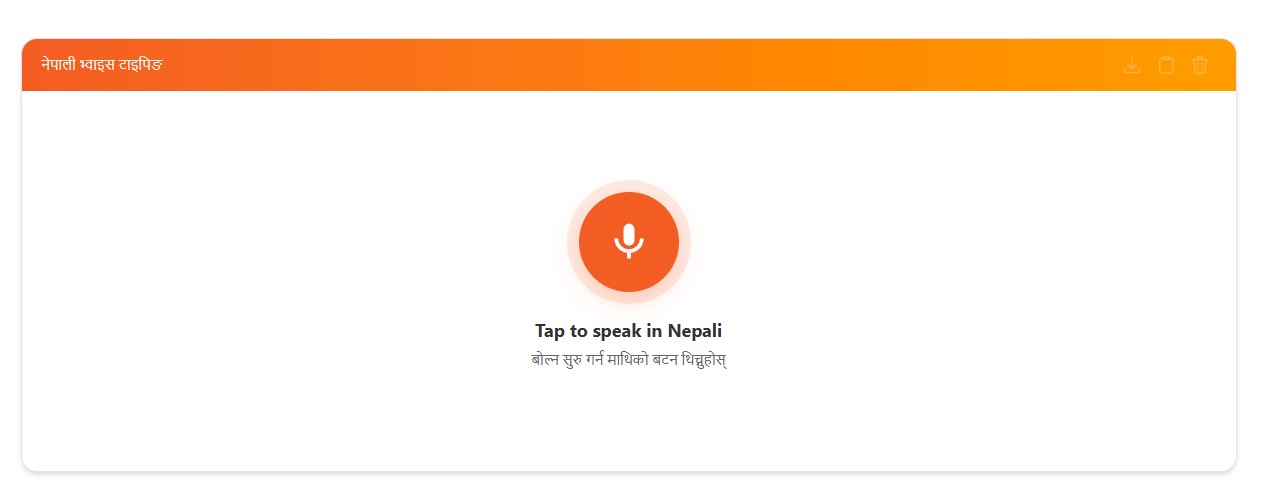
Step 4: Your browser will ask for microphone permission. Click Allow to grant access.
Step 5: Start speaking clearly in Nepali. You will see your words appearing as Devanagari text in real time as you speak.
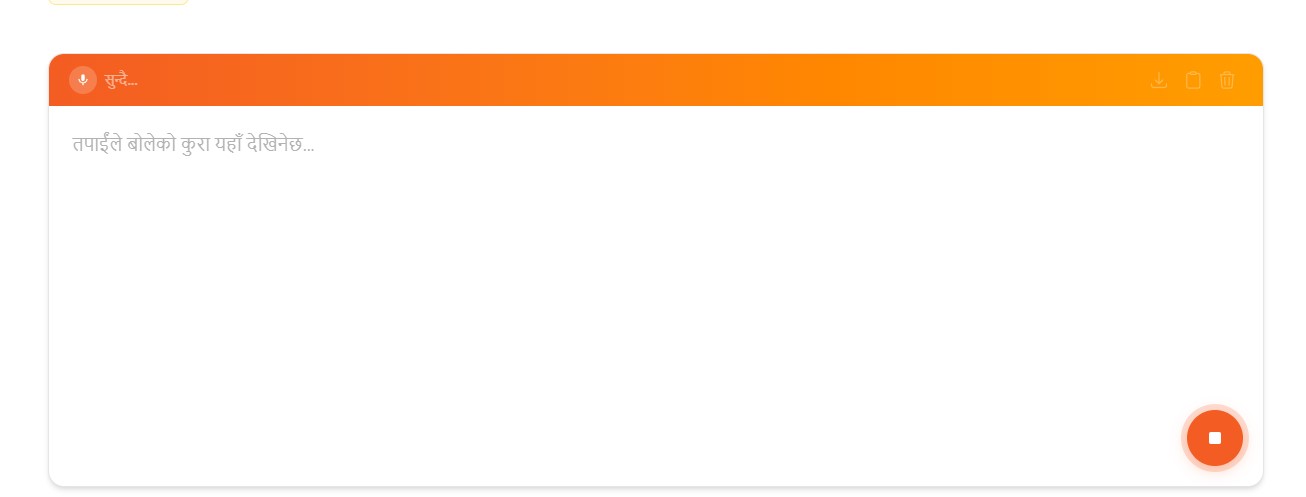
Step 6: When you are done, click the microphone button again to stop listening. You can now edit, copy, or use the text anywhere you need it.
It is that simple. No sign-up, no downloads, no complicated setup. Just speak and your words become text.
Benefits of Nepali Voice Typing
Why should you use voice to text Nepali instead of traditional keyboard typing? Here are the key advantages:
Speed
The average person types 30 to 60 words per minute on a keyboard, but speaks at 120 to 150 words per minute. Nepali voice typing lets you produce content at up to three times the speed of manual typing. This is a game-changer for long documents, emails, and essays.
Ease of Use
There is zero learning curve. You do not need to memorize any keyboard layout — not Preeti, not Romanized, not traditional Devanagari. If you can speak Nepali, you can use this tool immediately.
Accessibility
Voice to text Nepali is a lifeline for people with motor disabilities, repetitive strain injuries, or visual impairments. It removes the physical barrier of typing and makes Nepali content creation accessible to everyone.
Privacy
TypeNepal's voice typing tool processes everything through your browser. No audio files are uploaded to our servers. No transcriptions are stored. Your dictation is completely private.
Cost
Our Nepali voice typing tool is 100% free. There are no premium tiers, no word limits, and no advertisements. Use it as much as you need.
Tips for Better Voice to Text Nepali Accuracy
While modern speech recognition is remarkably accurate, following these best practices will ensure you get the best results from Nepali voice typing:
1. Use a quality microphone. Built-in laptop microphones work, but a dedicated headset or external USB microphone significantly improves recognition accuracy by reducing ambient noise.
2. Find a quiet environment. Background noise — conversations, traffic, music — confuses the speech engine. A quiet room produces the cleanest transcriptions.
3. Speak at a natural pace. Do not rush, but do not speak unnaturally slowly either. A moderate, conversational pace gives the engine the best chance to recognize each word correctly.
4. Pronounce clearly. Enunciate consonants and vowels clearly, especially conjunct characters (संयुक्त अक्षर) and similar-sounding words. Clear pronunciation dramatically improves accuracy.
5. Use Chrome or Edge. These browsers have the most advanced Web Speech API implementations with the best Nepali/Hindi language models. Firefox and older browsers may not support voice typing at all.
6. Ensure a stable internet connection. The speech recognition processing relies on cloud-based models, so a reliable internet connection is essential for real-time transcription.
7. Proofread your text. No speech-to-text engine is 100% perfect. Always give your transcribed text a quick review to catch any misrecognized words before publishing or sharing.
Voice to Text Nepali vs Keyboard Typing: Which is Better?
The answer depends on your use case. Here is a quick comparison:
| Feature | Nepali Voice Typing | Keyboard Typing |
|---|---|---|
| Speed | 120–150 words/min | 30–60 words/min |
| Learning curve | None | Requires practice |
| Accessibility | Hands-free | Requires motor skills |
| Best for | Long content, drafting | Precise editing, coding |
| Accuracy | 90%+ (quiet environment) | Depends on skill |
| Cost | Free on TypeNepal | Free (keyboard needed) |
For most Nepali writing tasks — drafting documents, composing messages, creating content — Nepali voice typing is faster and more convenient. For tasks that require precise character-level control, like editing code or filling forms, keyboard typing remains essential. Many users find the best workflow is to dictate first with voice typing, then edit with the keyboard.
Frequently Asked Questions
Does Nepali voice typing work on mobile phones? Yes. Open the TypeNepal voice typing page on Chrome for Android or Safari on iOS. Tap the microphone button and start speaking. The experience is nearly identical to desktop.
Is there a word limit or time limit? No. You can dictate for as long as you need. There are no artificial limits on TypeNepal's voice to text Nepali tool.
Can I use voice typing for official documents? Absolutely. The output is standard Unicode Devanagari text that is compatible with all modern word processors, email clients, and government portals. You can also use our Unicode to Preeti converter if you need Preeti format for legacy systems.
What if the recognition is not accurate enough? Try improving your microphone setup, reducing background noise, and speaking more clearly. You can also edit the transcribed text directly in the text area before copying it.
Start Using Nepali Voice Typing Today
Nepali voice typing is the fastest, most accessible way to write in Nepali. Whether you are a student, professional, content creator, or simply someone who prefers speaking over typing, TypeNepal's free voice to text Nepali tool is built for you.
Open the Nepali Voice Typing tool and start speaking. Your words become text — instantly.
Umesh Chapagain
Founder & Lead DeveloperUmesh Chapagain is the founder of TypeNepal and a software engineer with extensive experience in building web applications for language accessibility. He specializes in Unicode standards, Devanagari typography, and browser-based tool development. His work focuses on creating free, privacy-first tools that make Nepali and Hindi digital communication accessible to everyone — from students and professionals to the global Nepali diaspora.
Related Articles
How to Use Free and Easiest Nepali Typing Tool: Type in English(Romanized), Get Nepali Text
Learn how to use the Easiest Nepali Typing tool to convert English (Romanized) text into Nepali Devanagari script instantly. Includes word examples and a primer on Nepali alphabets.
How to Type Nepali: Complete Romanized Keyboard Guide
Learn how to type Nepali using Romanized phonetic input. This guide covers vowels, consonants, vowel signs, digits, special symbols, and word examples to help you type Devanagari script effortlessly.
How to Type in Nepali: The Ultimate Guide to Online Tools & Keyboard Layouts
Discover the easiest ways to type in Nepali using phonetic transliteration, traditional keyboards, and voice typing. Learn how to write in Nepali Unicode, configure layouts, and boost your typing speed.